
Edge Apps explained
In this page you will read about how to run Edge Apps on your SecureEdge Pro.
Required hardwareRequired hardware: You will need a SecureEdge Pro to be able to run Edge Apps.
Pay attention to the device's processor architecture!When creating your own image, keep in mind that the SecureEdge Pro uses an ARM64 (linux/arm64v8) processor architecture, therefore the image you will use must be compatible with it.
Definition
Edge Apps are containerized applications that run locally on the SecureEdge Pro, enabling machine builders to deploy custom or standard software for low-latency processing, offline operation, and machine-specific functionality. Furthermore, it is possible to customize your software according to your needs.
If the Edge App has a HTTP web interface, then you can easily access it from the Portal using HTTP EasyControl.
How to install an Edge App
There are two ways to install Edge Apps:
- Manual, direct installation on one SecureEdge Pro at a time. This method does not need any module to be used.
- Scalable installation on a greater amount of SecureEdge Pros using the Edge App Management module.
Which installation method should I choose?
- We recommend picking the direct installation when an Edge App is only needed to be installed on one or only a few SecureEdge Pros.
- If you possess many SecureEdge Pros, manual installation on each one of them would take a lot of time off your hands, and updating the Edge App would also have to be done manually. For this reason, in this case we recommend using the Edge App Management module, as it would allow you to save time and to scale more smoothly.
Marketplace Edge Apps cannot be installed via Edge App Management, but only manually through direct installation.
Prerequisites
To dive into this topic, a basic knowledge of Docker technologies and Docker Desktop or related tools is assumed.
Manual and direct installation on a SecureEdge Pro
By navigating to the Marketplace, pick an Edge App of your choice (for example Grafana) and follow the instructions in the "How to install" section. Often, these will redirect to the IXON's public Github repository, where the project's README.md file will contain a step-by-step installation guide. Follow them to start using your app.
Before you start...Make sure to check out the Running custom Docker applications on the SecureEdge Pro support article to learn how to set up your Docker environment properly and to get more information about manual installation of Edge Apps.
Scalable installation via Edge App Management
Required ModulesTo use this functionality, you will need the Edge App Management module. Check your modules at Admin > Licenses.
This module is necessary to be able to manage Edge Apps in the Portal without installing them manually on the SecureEdge Pro. To obtain it, contact your IXON account manager or IXON distributor.
Thanks to Edge App Management, you will be able to install Edge Apps by deploying an Edge App once to your IXON Cloud company and install it plug-and-play on multiple devices afterwards. For this solution, you will need to use the Edge App Management Workspace. To start using it, follow the instructions in the Getting Started section on Github.
Using private registries
In case you are using a private registry, you have to configure the registry both locally and in the IXON Cloud following these steps:
- Set up the Private container registry credentials locally.
- Configure the registry in the IXON Cloud by navigating to Studio > Developer > Edge Apps and pressing the Cogwheel icon on the top right. You will have to set up the same credentials that you have set up locally.
How to install an Edge App with Edge App Management
Before moving on to the next steps, make sure to validate your Edge App by running the command found in the Validating your Edge App section.
After this, you can start following the steps to upload an Edge App to your device:
-
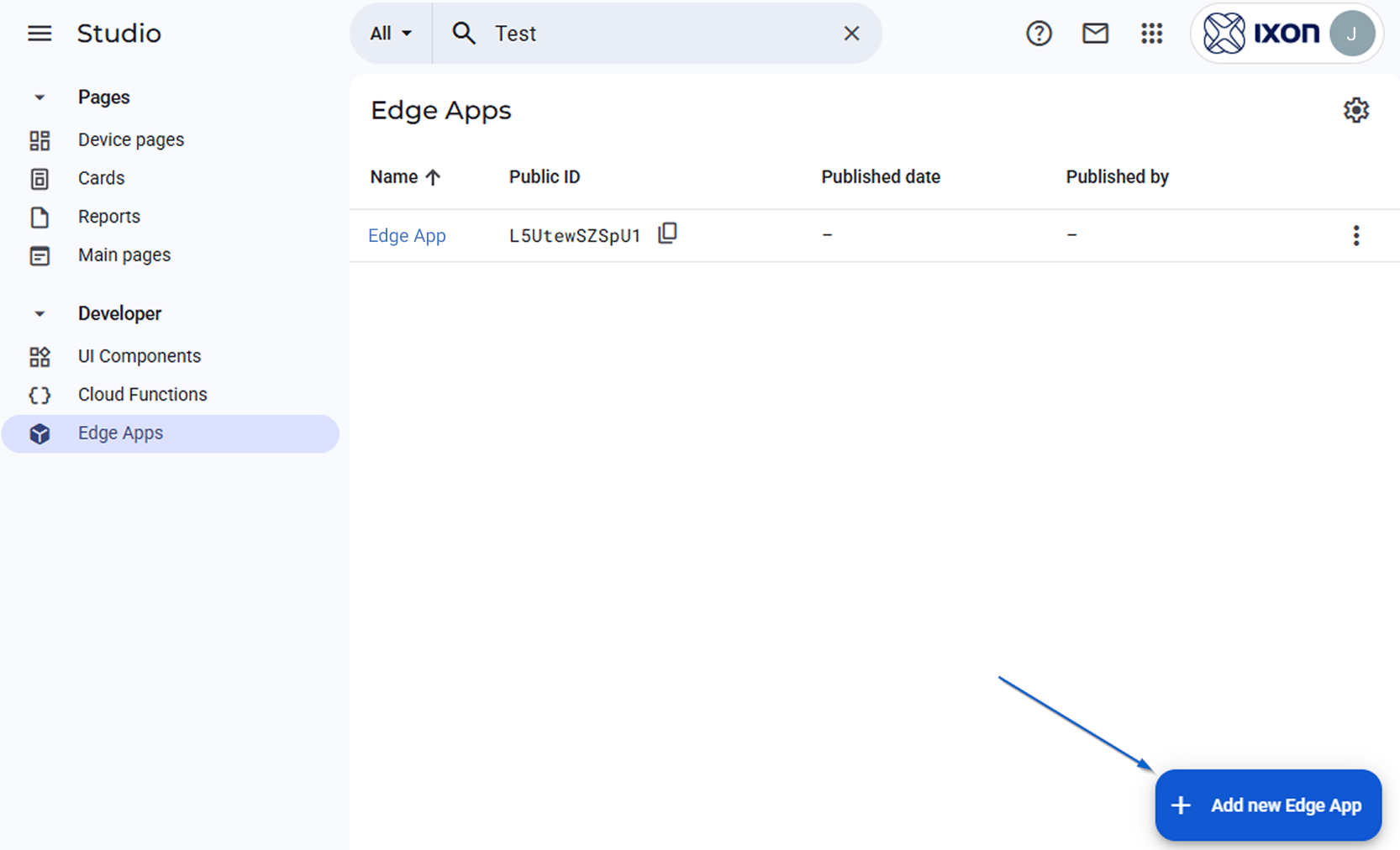
Navigate to Studio > Developer > Edge Apps.
-
Press the Add new Edge App button and provide the name of the Edge App.
-
Copy the Public ID of the Edge App and navigate to the
config.jsonfile found in the Edge App Management Workspace and replace it in theedgeAppfield as explained in the Uploading your Edge App to IXON Cloud section.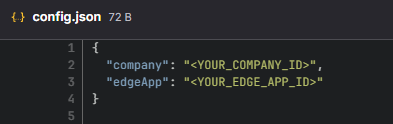
-
Repeat this step with the Company ID of the company you want to deploy the Edge App in.
-
The same section of the
README.mdfile mentions the creation of a.accesstokenfile. Follow the instructions and create the file in the root folder of the workspace.Expiration of the.accesstokenFrom the moment the user signs up to the IXON Portal page where the
.accesstokenis taken from, the token will be valid for 30 days.This token is only needed when deploying a custom Edge App to the IXON Portal. Its expiration will not affect the app's functionality; the app will continue to work in the IXON Cloud.
-
Finally, run the upload command found in the section mentioned in step 3. Make sure to pick the command that's compatible with your Operating System.
-
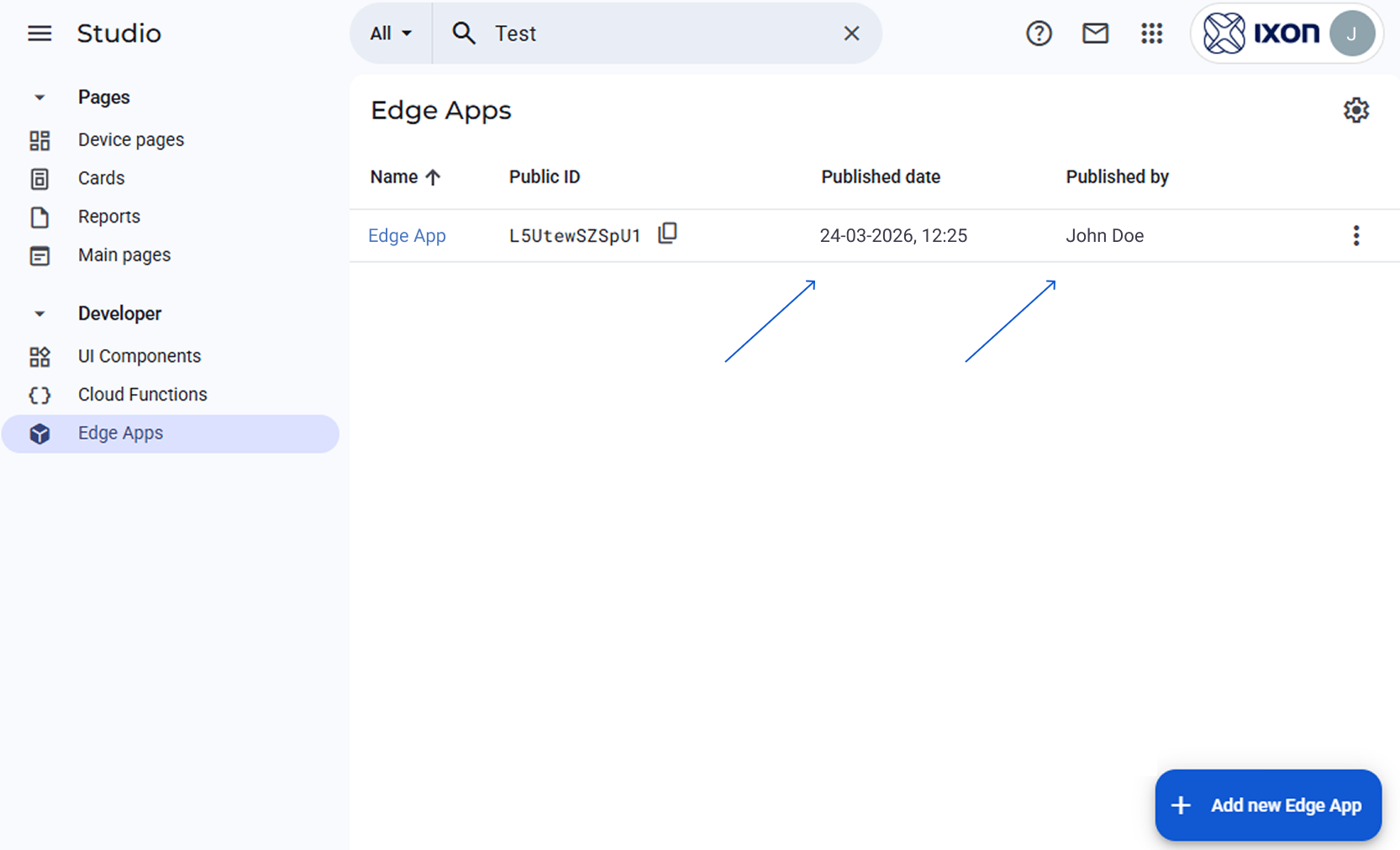
Your Edge App should now be visible in the Studio. This is confirmed if the Published date and Published by columns are populated.
-
Now that the Edge App has been added to your company account, you can add it to an edge gateway. To do so, follow the steps found in Add an Edge App to an edge gateway.
How to set a restart policy
If a device is rebooted, the Edge App containers will not restart automatically. To allow that, the developer must add a restart policy in the Docker compose file.
We support the following options for the restart field in the compose.yaml:
noalwayson-failureunless-stopped
Additionally, it is possible to restart a container manually in the local web interface of the SecureEdge Pro.
Can Edge Apps be deployed, started and managed through IXON Cloud without enabling VPN access for users?Once an Edge App version is deployed to the Cloud, users can deploy it on individual devices without needing VPN access to the device.
Updated 3 months ago