
Service Accounts access tokens
Create a non-personal account that gives you both an Application ID and a permanent Service Account access token.
Required modulesService Accounts are included in the API Integrations module. Check your modules in Admin > Licenses.
What is a Service Account?
Service Accounts are non-personal "accounts" that let external IT applications communicate securely with the IXON Cloud API via an application ID and a permanent access token tied to it. Using a Service Account is the recommended way to authenticate an API integration.
Service Accounts rate limits
Service Accounts have the same rate-limiting thresholds as standard human user accounts. Check API rate limits for more information.
Advantages of Service Accounts
-
No email, password or 2FA needed: the token isn't tied to personal login credentials, so there are none to provide, rotate or store.
-
Unlimited creation: you can create as many as you like — ideally one per integration, so you can revoke or re-scope a single integration without touching the others.
-
Configurable role: Service Accounts are created with an Administrator role by default, but access can be restricted. Give each one only the permissions its integration actually needs.
-
No expiration: unlike user access tokens from the AccessTokenList endpoint, Service Account access tokens do not expire. There's no renewal logic to build.
-
Business continuity: if the user who originally created the Service Account is deleted or leaves the company, the Service Account remains active.
-
Service Accounts for end customers: machine builders can extend Service Accounts to their end customers, giving them isolated access to their own devices.
Limitations of Service Accounts
Service Accounts cannot be used for integrations of IXON Cloud functionalities that require human credentials.
Below you can find a list of these limitations:
-
The following functionalities and their related endpoints are not supported:
- Access Requests cannot be approved or rejected. Requests for connections protected by Access Requests are automatically denied.
- Message Center filters cannot be configured to forward to e-mail addresses.
- Companies cannot be created with a Service Account.
- Endpoints related to
MyUserare not available via Service Accounts (MyUserEmailAddressChangeList,MyUserOtpAuthEnable,MyUserOtpAuthSmsEnable,MyUserPassword). - Scheduled Reports endpoints:
QueueReportList.
-
No web or app access: Service Accounts cannot be used to log into the IXON Cloud web interface or into the mobile app.
-
A Service Account access token cannot be used to for login integrations.
-
No email-based features: anything that delivers to a mailbox, such as Scheduled Reports and Email Notifications, is unavailable.
If you need any of the above...Those cases require a user access token, generated against a real user account. Check User access tokens for more information.
Service Account Permissions
There are two distinct types of permissions:
Permissions to create and manage Service Account
- Only Company Admins can create and manage Service Accounts.
- Temporary users that have company admin permissions cannot manage Service Accounts.
Permissions belonging to a Service Account
- Once created, a Service Account gets the Platform Administrator role, which can be narrowed down to specific roles and permissions.
It is recommended to reassign roles and permissions based on the integration's needs after creating the Service Account to avoid security-related issues.
How to change or manage permissions of a Service Account
Roles and permissions of a Service Account can be edited in different ways.
How to add a role to a Service Account
-
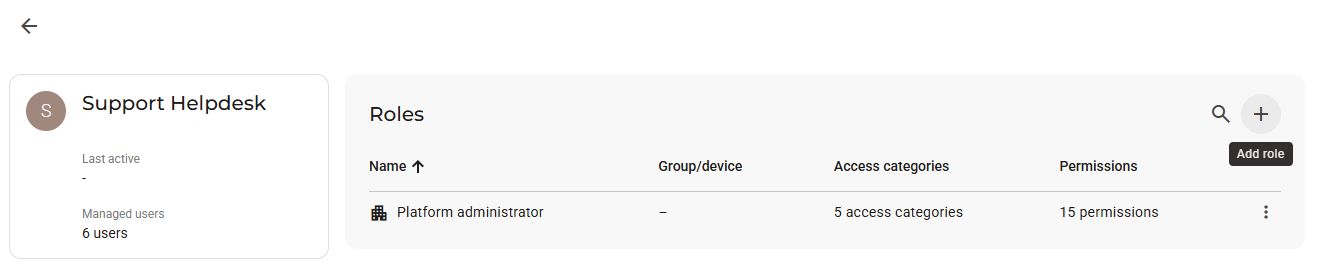
After creating a Service Account, select it and click on the "+" icon (Add role).
-
Select whether you want to assign a Company-wide, Group-specific or Device-specific role.
-
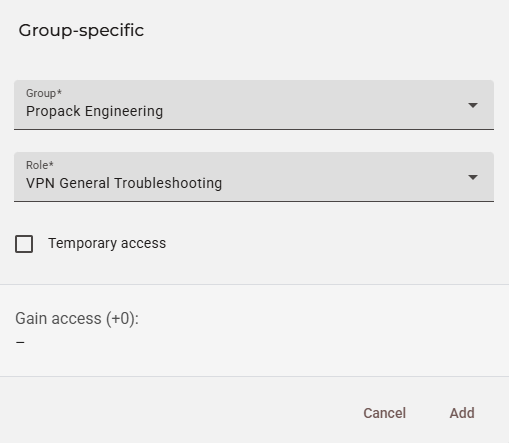
In this example, a Group-specific role will be assigned. Select the group, role and click on Add.
How does Temporary access work when using Service Accounts?The same temporary access functionality used for human user management applies to Service Accounts.
For example, a temporary role could be a valid way to control access for some use cases, allowing the integration to manage visibility by using list endpoints to get the accessible resources.
For more information, you can check this support article (temporary access section).
How to edit a role of a Service Account
-
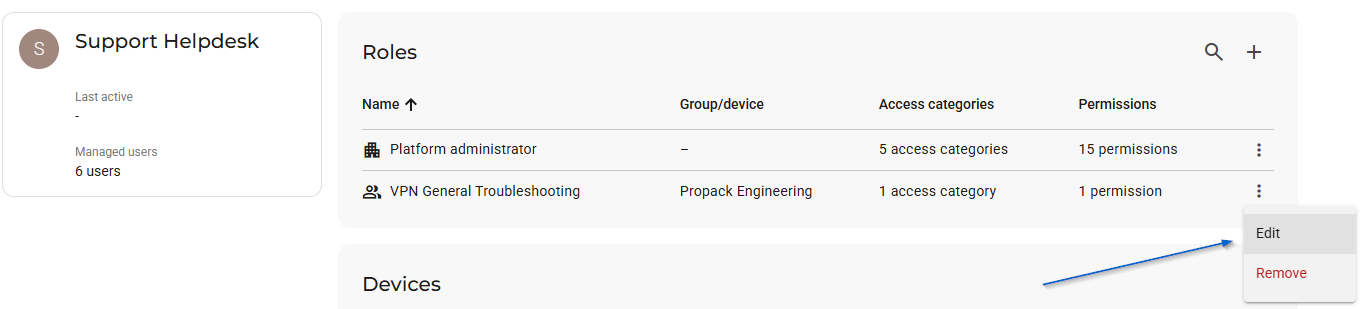
Click on the ⋮ More options icon and click on Edit.
-
Select a different group and/or role.
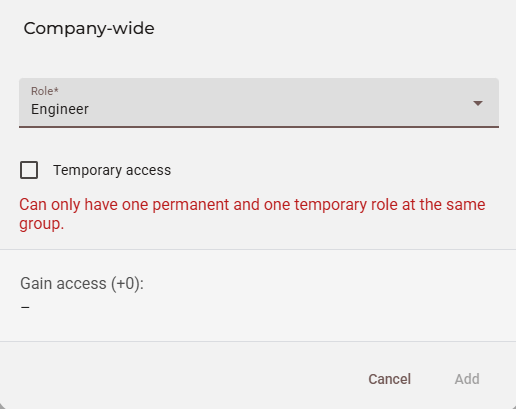
Why am I getting a "Can only have one permanent and one temporary role at the same group" error?This message appears whenever a user tries to add a second company-wide role when one is already assigned. If a user wants to assign a different company-wide role, it is recommended to edit the Platform Administrator role instead, which is assigned by default.
How to create a Service Account
Before you start, make sure to be a permanent Company Admin: this is the only permission that allows a user to create a Service Account.
-
Navigate to Admin > Integrations > Service Accounts, click Create Service Account and enter the name of the integration.
-
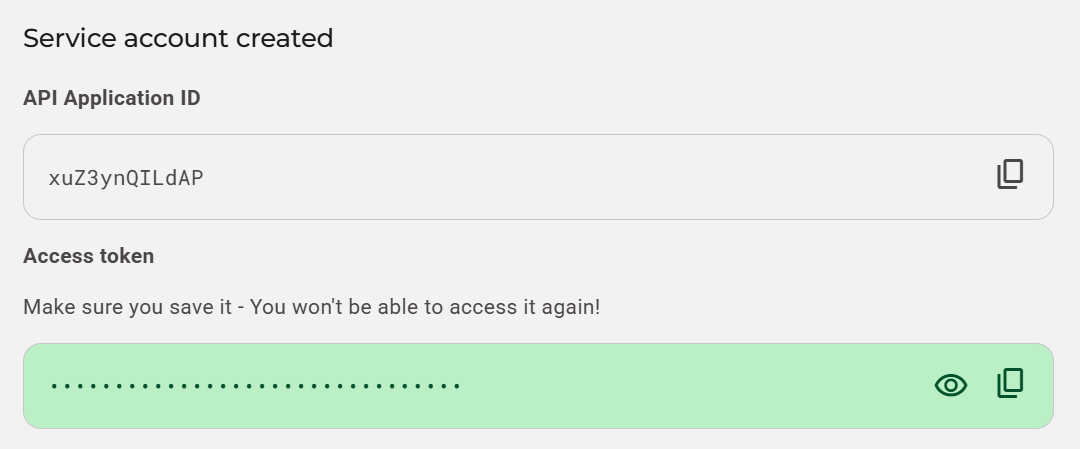
A dialog shows the Application ID for the Service Account and its Access Token. These are the two credentials your integration needs to perform API calls.
-
Open the Service Account in the User view to manage its role, the devices it can reach, and its managed users. For more information, check How to change or manage permissions of a Service Account.
This role applies only to the Service Account access token!The role handles calls made with this Service Account's own access token. It does not apply to user access tokens requested with this Application ID — instead, in that scenario, the credentials of the person who signed in handle permissions.
Example
The Application ID goes in the Api-Application header, and the access token in the Authorization header, prefixed with Bearer. Here they are on a real call — AgentList, which returns the agents in a company:
curl --request GET \
     --url 'https://portal.ixon.cloud/api/agents' \
     --header 'Api-Version: 2' \
     --header 'Api-Application: 7NWcb4adPRTK' \
     --header 'Api-Company: <your company publicId>' \
     --header 'Authorization: Bearer Z6XevvDES13tQ2Ti3nDVBJyWS0kRw5D1'
A successful response lists the agents the Service Account's role gives it access to:
{
    "status": "success",
    "type": "AgentList",
    "data": [
        {
            "publicId": "$agentPublicId",
            "name": "$agentName"
        }
    ]
}
The same two headers work on every endpoint; only the URL changes. For Api-Version, Api-Company and the other headers every call needs, see IXON API prerequisites.
What should I do if I lose my Access Token?
There's no way to retrieve it.
For a matter of safety, it is recommended to delete the Service Account whose access token was lost and create a new one, replacing both the application ID and the access token in your integration.
Updated about 1 month ago