
A guide to data mapping in IXON Cloud
This article explains how to connect the dots between your relational database setup and the raw historical data stored in your time-series database.
In modern IoT architectures, a single database is rarely enough. To provide a rich user experience while maintaining high-performance data ingestion, we split the responsibility between two worlds:
- Relational: Stores human-readable names, relationships, and configurations (e.g.
publicIdof anagentor of adataSource). - Time-series: Stores high-speed, raw time-series data points (e.g. a sensor's temperature as
valueat a specifictime) using optimized IDs.
This article explains how these two worlds are connected; this knowledge is particularly useful to understand the mechanisms behind data retrieval via direct InfluxDB access.
The relational architecture
In our SQL relational database, data is organized hierarchically. This allows for strict validation and easy navigation of the structure of our Cloud. Here are a few brief definitions of the resources involved:
-
Agent: The physical hardware gateway.
-
DataSource: The specific protocol or device (e.g., a PLC) connected to the Agent.
-
Tag: The specific data point being tracked.
-
Variable: Defines the type data (Boolean, Integer, etc.).
Limitations
While this structure is great for organization, querying billions of rows in this nested format would be incredibly slow. This is why we "flatten" this data when it moves to the time-series database instance, only storing relevant IDs as field keys and timestamps.
The time-series architecture
As we already implied in the previous paragraph, InfluxDB doesn't understand "names" or "relationships"; it wants about keys and timestamps. To keep InfluxDB lean, we avoid storing strings like "Main Conveyor Belt" for every data point. Instead, we use IDs.
The connection is made via a generated field key. By combining the variable type and the tag ID, we create a unique identifier that tells InfluxDB exactly what kind of data it is holding without needing to perform a "Join" with the relational database.
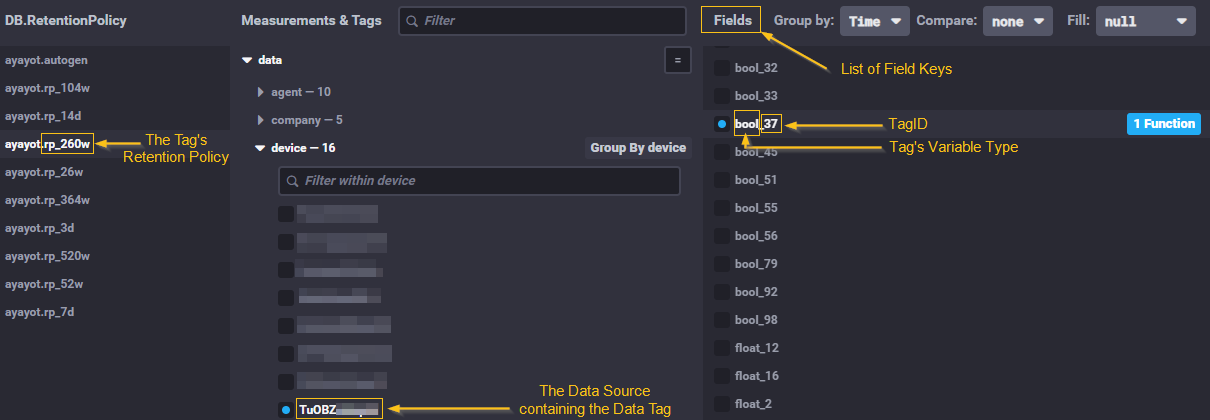
Resource mapping: who lives where?
Use this table to understand where each resource or field is handled or stored, and how it is referenced across databases.
| Resource/Field | Found in Relational Database? | Found in InfluxDB? | Role in the architecture |
|---|---|---|---|
| Agent | Yes | No | Its publicId (string) is retrieved and used to find one or more data source(s). |
| Data Source | Yes | Yes (through its publicId) | Its publicId (string) is used as the device tag filter. |
| Tag | Yes | Yes (through its tagId) | Its tagId (int) is the suffix of the Influx field, unique on a data-source basis (e.g. 37). |
| Slug (of a tag) | Yes | No | A human-readable label (string, e.g. "batch-trigger") used to look up a tag. Unique on a data-source basis, mapping 1:1 to its tagId. |
| Variable | Yes | Yes (through its type) | Its type (string) is the prefix of the Influx field (e.g. "bool", "int"). |
| Retention Policy | Yes | Yes | A piece of text (string) that determines how long data is kept (e.g. "260w", meaning "260 weeks"). |
Retention Policy: In which cases can it benull?
- A retention policy can be
nullif a tag belongs to Apps such as Settings Tracking or State Analysis: In this case, they are not stored in InfluxDB, so the tag does not necessarily get removed.- Another case could be a tag that uses a custom MQTT broker: These also do not have a retention policy.
In short, we could say that if tags are logged into InfluxDB, then they will have a retention policy.
The structure of a tag's identifier as field key
This table shows exactly how the information you see in your API's response results translates into the keys you need for an InfluxDB query.
| API's JSON response | Syntax | InfluxDB field key |
|---|---|---|
"variable.type": "bool" and "tagId": 37 | bool + _ + 37 | bool_37 |
"variable.type": "float", "tagId": 102 | float + _ + 102 | float_102 |
"variable.type": "int", "tagId": 5 | int + _ + 5 | int_5 |
Example of an implementation
When your application wants to display a graph for "Temperature," the underlying logic looks like this:
- API Response: You find that "Temperature" has a
tagIdof 42 and avaryable.typevalue of float. - Mapping: Your code generates the field name
float_42. - Query: You run
SELECT "float_42" FROM "device" WHERE "device" = 'YOUR_DATASOURCE_ID'.
tagId vs. slug vs. publicId: differences and relationships
tagId vs. slug vs. publicId: differences and relationshipsA single tag carries three different identifiers, and telling them apart is one of the most common points of confusion.
The following sections clarify how the tagId relates to the slug — and how both differ from the publicId.
Three identifiers for one tag
Identifier Type Lives in Used for tagIdintTime-series InfluxDB The database identifier (e.g. 37). Combined with the variabletype, it forms the InfluxDB field key.slugstringRelational Database A human-readable lookup label (e.g. "batch-trigger").publicIdstringRelational Database Mainly used for resource manipulation via API ( GET,POST, …). Never used in InfluxDB queries.
They identify the same tag... but in different ways
Neither value is derived or calculated from the other. Every tag is created with all three identifiers:
-
tagIdis an integer (for example,37). It is the machine-facing database identifier that InfluxDB actually stores data against. In short: theslugis the name you search by; thetagIdis the number the database stores by. -
slugis a human-readable string (for example,"batch-trigger"). It exists so that people don't have to memorize numeric IDs. It is optional and meant to be recognizable to you. -
publicIdis an identification string (for example,"6Y8DfPrzLhT1"). In the IXON Cloud environment,publicIdsare used as unique identifiers for all resources.ApublicIdis not always usefulGiven the structure of the architecture of resources within the IXON Cloud, a
publicIdcan always be present, but will not necessarily be used in queries.
In a use case where data retrieval is implemented, thepublicIdof a Data Tag will not be relevant, but itstagIdorslugwill be!
To learn more about whatpublicIdsare for, check How to identify resources and types: the publicId.
1:1 correspondence per data source
Both the slug and the tagId are unique within a single data source, not across the
whole agent. So within one data source a given slug always points to exactly one tagId,
and vice versa. Across different data sources on the same agent, the same value could
reappear, which is why queries should always be scoped to a specific data source
(filtering on source.publicId) to avoid collisions.
Updated 4 months ago