
What is a Cloud Function?
A high-level introduction to Cloud Functions, what they do, and where they fit in IXON Cloud.
Required moduleRequired module: App engine - Cloud Functions. Check your modules at Admin > Licenses. To obtain this module, contact your IXON account manager or IXON distributor.
Definition
A Cloud Function is a piece of Python code that runs server-side in IXON Cloud. It is most often triggered by a UI Component a user interacts with in IXON Cloud, but it can also be called directly by another backend or automation.
Whatever invokes it, the function executes safely on IXON's infrastructure rather than on the end user's device — so secrets, credentials, and privileged operations never leave the server.
In its simplest form, a Cloud Function is a single Python file with one decorated function. Only functions explicitly marked with @FunctionContext.expose can be called from outside the workspace:
from ixoncdkingress.function.context import FunctionContext

@FunctionContext.expose
def hello_world(context: FunctionContext, **kwargs: dict[str, str]):
    return {
        'message': 'Hello World'
    }
How a Cloud Function fits in
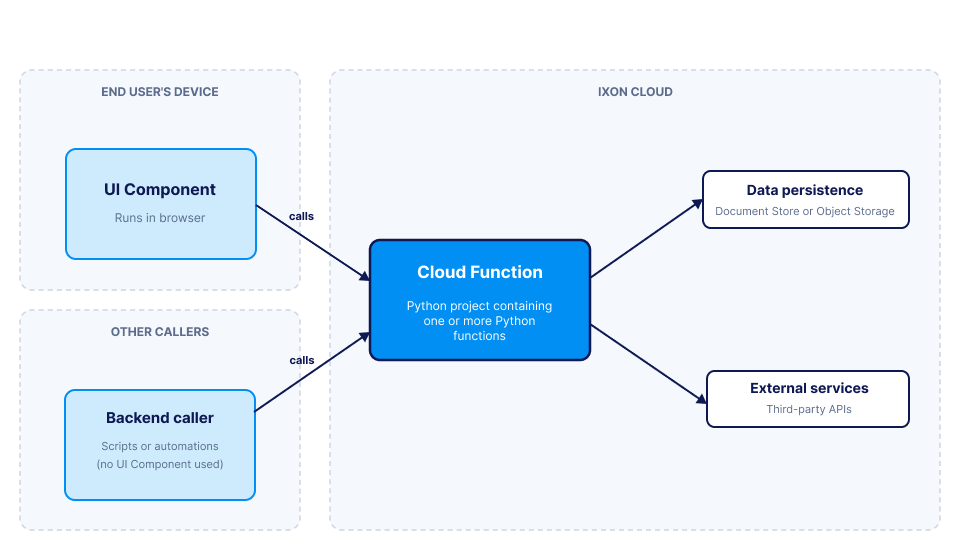
The diagram shows the three pieces a Cloud Function sits between:
- On the left, the callers — most commonly a UI Component running in the end user's browser, but a backend script, integration, or automation can also call a Cloud Function directly without any UI.
- In the centre, the Cloud Function itself — Python code running server-side in IXON Cloud.
- On the right, the things a Cloud Function operates on — data persistence (Document Store and Object Storage) and any external services your app integrates with.
The Cloud Function decides what to read, what to write, and what to return to the caller.
The FunctionContext
The first parameter every exposed function receives is the FunctionContext, an object that gives the function everything it needs at runtime: who's calling, the active company and (where applicable) the active agent or asset, configuration values, an authenticated client for the IXON API, and clients for Document Store and Object Storage. The remaining parameters are whatever you define — they're set by the caller when invoking the function.
What you can do with a Cloud Function
To find out what Cloud Functions are used for, take a look at Cloud Functions: when to use them.
Updated 3 months ago