---
updatedAt: 2026-04-30T11:51:09.000Z
agentTools:
projectIndex: https://developer.ixon.cloud/llms.txt
---
# Manage access requests
This article will explain how to work with Access Requests through API endpoints.
In a company, as explained thoroughly in this support article, it is possible to manage user permissions in many different ways, providing **more control** over sensitive information and data. However, there are situations where a user may need temporary or exceptional access to a device, such as for troubleshooting or providing technical assistance.
To tackle this issue, the admin can simply toggle a configuration in the device to make it so that a certain type of user (based on roles, groups, etc.) must send an **access request** and **receive approval** before being able to gain control of that device. You can see the configuration button in this paragraph of the support article.
Needless to say, you can perform these actions by calling some **API endpoints** as well, as shown in the following sections.
## What you will need
Your **Application ID**, a **Company ID**, an **Agent ID** and **bearer tokens** will all be necessary to successfully call these endpoints. To learn how to get them, please refer to their respective sections.
> 🚧 About bearer tokens
>
> If the API endpoint performs an action that a sender of a request would perform (e.g., **creating** a request or **resending** one or multiple requests), then you will need to use their bearer token, and not that of a request's approver.
## Get a list of access requests or create a VPN access request
The **GET verb of AgentAccessRequestList** allows the **retrieval of a list of Access Requests**, whereas its **POST verb** allows to create one or multiple **VPN** access requests using the `bearer token` of the **sender** of the access request. Both requests will need an `agentId`.\
**Important notes**:
* The GET request can be performed with the `bearer token` of either the sender or the approver;
* The POST request `end` field must contain a **future date**. If it doesn't, an error will be thrown;
* In this specific POST request, the `servers` object can be left empty.
```curl GET AgentAccessRequestList
curl --location 'https://portal.ixon.cloud/api/agents/$agentId/access-requests?fields=*' \
--header 'Api-Company: $companyId' \
--header 'Api-Version: 2' \
--header 'Api-Application: $applicationId' \
--header 'Authorization: Bearer $bearerToken'
```
```json Response GET
{
"type": "AgentAccessRequest",
"data": [
{
"publicId": "req1publicId",
"vpn": true,
"start": "2025-07-10T08:16:00Z",
"end": "2025-07-10T08:46:00Z",
"status": "pending",
"reason": "Troubleshooting.",
"createdOn": "2025-07-10T08:17:05Z",
"updatedOn": null,
"reviewExpiresOn": "2025-08-09T08:17:05Z"
},
{
"publicId": "req2publicId",
"vpn": true,
"start": "2025-07-10T09:18:00Z",
"end": "2025-07-10T10:18:00Z",
"status": "revoked",
"reason": "Troubleshooting.",
"createdOn": "2025-07-10T09:18:33Z",
"updatedOn": "2025-07-10T09:27:29Z",
"reviewExpiresOn": "2025-08-09T09:18:49Z"
},
{
"publicId": "req3publicId",
"vpn": true,
"start": "2025-07-10T16:16:00Z",
"end": "2025-07-11T00:16:00Z",
"status": "pending",
"reason": "Troubleshooting.",
"createdOn": "2025-07-10T14:00:54Z",
"updatedOn": null,
"reviewExpiresOn": "2025-08-09T14:00:54Z"
}
],
"moreAfter": null,
"status": "success"
}
```
```curl POST AgentAccessRequestList
curl --location 'https://portal.ixon.cloud/api/agents/$agentId/access-requests' \
--header 'Api-Version: 2' \
--header 'Content-Type: application/json' \
--header 'Api-Application: $applicationId' \
--header 'Api-Company: $companyId' \
--header 'Authorization: Bearer $bearerOfTheSender' \
--data '{
"vpn": true,
"servers": [],
"start": "2025-07-10T16:16:00Z",
"end": "2025-07-11T00:16:00Z",
"reason": "Creating a VPN access request for troubleshooting.",
"allowedApprovers": [
{
"publicId": "$approversUserId"
}
]
}'
```
```json Response POST
{
"type": "CreateResponse",
"data": {
"publicId": "$requestPublicId"
},
"status": "success"
}
```
> ❗️ Pay attention to the value of the VPN field!
>
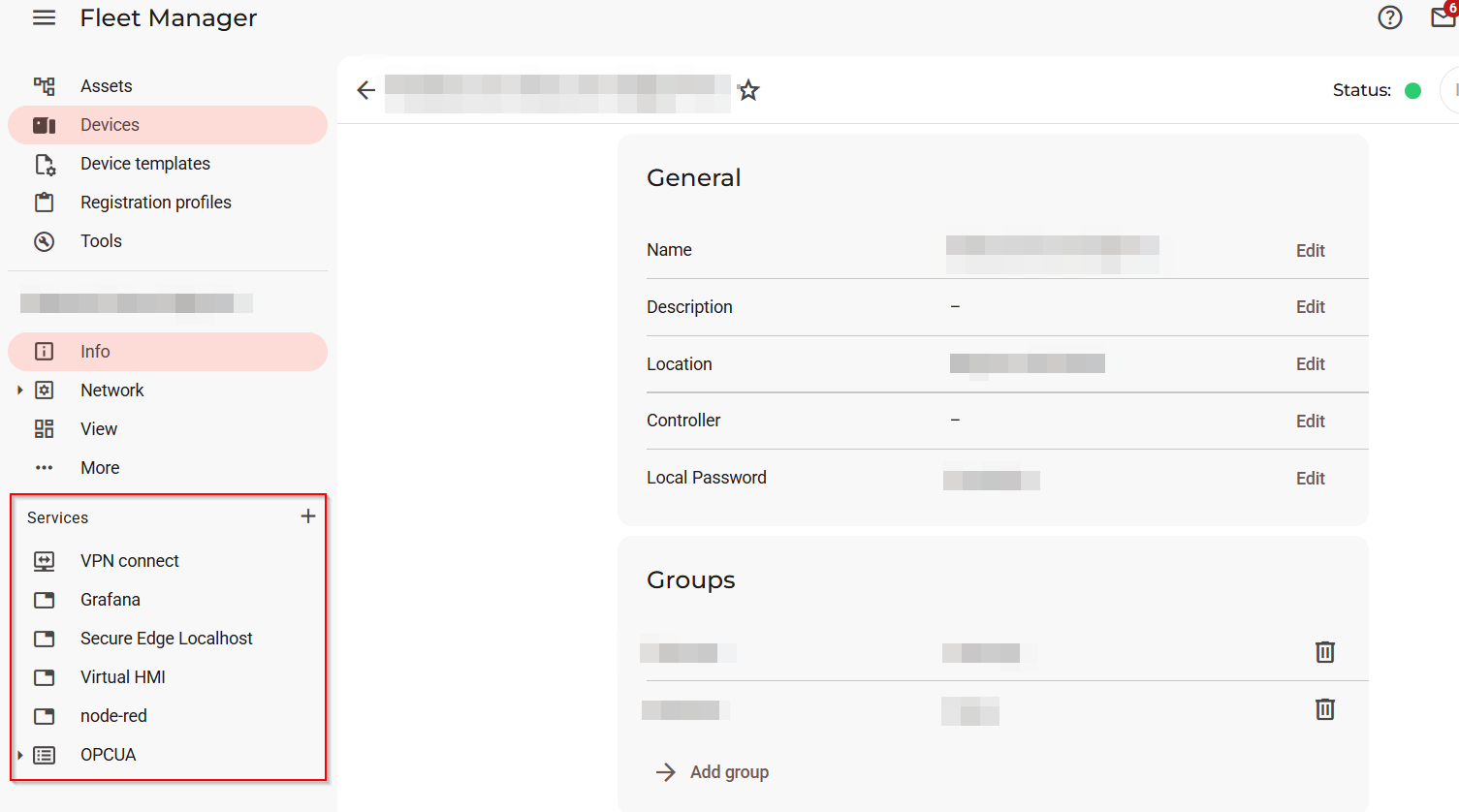
> In this example of a POST request of AgentAccessRequestList, we are creating an Access Request for a VPN connection. Despite being a **service** on paper, the **VPN connect** is not a `servers` object, unlike **VNC, HTTP or WebSocket** type of services. For this reason, whenever the Access Request is being created for one of the aforementioned services, the value of `vpn` must be set to `false`. You can visualize the services better by checking **Fleet Manager > Devices > Device of choice > Services** as shown in this picture:
>
> 
>
> Refer to the next section to learn more about this!
## Get an agent's service and create an access request
The process to get an **agent's service** uses the **AgentServerList** API endpoint: this way we will be able to retrieve data about the services that we have set up (keep in mind that the VPN connect service won't be in this list). To create an **access request to a service** we will use the same POST **AgentAccessRequestList** API endpoint that we mentioned in the previous section, but with a few changes in its body.\
You can call the endpoints in the following order to create a service access request:
### Get the serviceId
```curl GET AgentServerList
curl --location 'https://portal.ixon.cloud/api/agents/$agentId/servers?fields=*' \
--header 'Api-Version: 2' \
--header 'accept: application/json' \
--header 'Api-Application: $applicationId' \
--header 'Api-Company: $companyId' \
--header 'Authorization: Bearer $bearerToken'
```
```json Response
{
"type": "AgentServer",
"data": [
{
"publicId": "$service1publicId",
"type": "$service1Type",
"name": "$service1Name",
"port": $service1Port,
"username": null,
"password": null,
"hasPassword": false,
"landingPage": "$landingPage",
"connectionQuality": null,
"readOnly": null,
"vncRightClickOnTouchHold": false,
"vncEncoding": null,
"useSsl": false,
"visibleInMobileApp": true,
"visibleOnWeb": true,
"httpAuthenticationType": null,
"requireAccessApproval": true,
"serviceGroup": null
},
{
"publicId": "$service2publicId",
"type": "$service2Type",
"name": "$service2Name",
"port": $service2Port,
"username": null,
"password": null,
"hasPassword": false,
"landingPage": "$landingPage",
"connectionQuality": null,
"readOnly": null,
"vncRightClickOnTouchHold": false,
"vncEncoding": null,
"useSsl": false,
"visibleInMobileApp": true,
"visibleOnWeb": true,
"httpAuthenticationType": null,
"requireAccessApproval": true,
"serviceGroup": null
}
],
"moreAfter": null,
"status": "success"
}
```
**Note**: if needed, you can get one single service through the **AgentServer** API endpoint.
### Create the access request to the service
```curl
curl --location 'https://portal.ixon.cloud/api/agents/$agentId/access-requests' \
--header 'Api-Version: 2' \
--header 'Content-Type: application/json' \
--header 'Api-Application: $applicationId' \
--header 'Api-Company: $companyId' \
--header 'Authorization: Bearer $senderBearerToken' \
--data '{
"vpn": false,
"servers": [
{
"publicId": "$servicePublicId"
}
],
"start": "2025-07-11T10:16:00Z",
"end": "2025-07-11T18:16:00Z",
"reason": "Creating a service access request for troubleshooting.",
"allowedApprovers": [
{
"publicId": "$approversUserId"
}
]
}'
```
```json Response
{
"type": "CreateResponse",
"data": {
"publicId": "$requestPublicId"
},
"status": "success"
}
```
> ❗️ Note about approvers
>
> The `allowedApprovers` field **only** accepts approvers that are in the **Request Access dropdown** in the portal:
>
>
## Get an access request
The **AgentAccessRequest** endpoint will return the data of a **single** request:
```curl
curl --location 'https://portal.ixon.cloud/api/agents/$agentId/access-requests/$requestPublicId?fields=*' \
--header 'Api-Version: 2' \
--header 'Api-Company: $companyId' \
--header 'Api-Application: $applicationId' \
--header 'Authorization: Bearer $bearerToken'
```
```json
{
"type": "AgentAccessRequest",
"data": {
"publicId": "$accessRequestId",
"vpn": true,
"servers": [],
"start": "2025-07-10T08:16:00Z",
"end": "2025-07-10T08:46:00Z",
"status": "pending",
"reason": "I need access for troubleshooting.",
"createdOn": "2025-07-10T08:17:05Z",
"updatedOn": null,
"reviewExpiresOn": "2025-08-09T08:17:05Z"
},
"status": "success"
}
```
## Approve a request
The **[AgentAccessRequestAuthenticatedApprove](https://developer.ixon.cloud/reference/post_agents-agentid-access-requests-approve-publicid)** will **approve a request**. The response body will changed slightly based on that type of access has been approved, if for a **vpn** or a **service**:
```curl GET AgentAccessRequestAuthenticatedApprove
curl --location --request POST 'https://portal.ixon.cloud/api/agents/$agentId/access-requests/approve/$requestPublicId' \
--header 'Api-Version: 2' \
--header 'accept: application/json' \
--header 'Api-Application: $applicationId' \
--header 'Api-Company: $companyId' \
--header 'Authorization: Bearer $approverBearerToken'
```
```json Response for VPN
{
"type": "AgentAccessRequestApproveResponse",
"data": {
"deviceName": "$deviceName",
"serviceNames": [],
"vpn": true,
"emailAddress": "$senderEmailAddress"
},
"status": "success"
}
```
```json Response for a service
{
"type": "AgentAccessRequestApproveResponse",
"data": {
"deviceName": "$deviceName",
"serviceNames": [
"$serviceName"
],
"vpn": false,
"emailAddress": "$senderEmailAddress"
},
"status": "success"
}
```
**Note**: do not use the **AgentAccessRequestApprove** endpoint, as its use in intended to only work for the **request approval button** in the email.
## Reject a request
The **AgentAccessRequestAuthenticatedReject** will **reject a request** as an authenticated user. Once more, the response body will changed slightly based on that type of access has been approved, if for a **vpn** or a **service**:
```curl POST AgentAccessRequestAuthenticatedReject
curl --location --request POST 'https://portal.ixon.cloud/api/agents/$agentId/access-requests/reject/$requestPublicId' \
--header 'Api-Version: 2' \
--header 'accept: application/json' \
--header 'Api-Application: $applicationId' \
--header 'Api-Company: $companyId' \
--header 'authorization: Bearer $approverBearerToken'
```
```json Response for VPN
{
"type": "AgentAccessRequestApproveResponse",
"data": {
"deviceName": "$deviceName",
"serviceNames": [],
"vpn": true,
"emailAddress": "$senderEmailAddress"
},
"status": "success"
}
```
```json Response for a service
{
"type": "AgentAccessRequestApproveResponse",
"data": {
"deviceName": "$deviceName",
"serviceNames": [
"$serviceName"
],
"vpn": false,
"emailAddress": "$senderEmailAddress"
},
"status": "success"
}
```
**Note**: do not use the **AgentAccessRequestReject** endpoint, as its use in intended to only work for the **request rejection button** in the email.
## Get the list of approvers
The **AgentAccessRequestApproversList** will return the list of **approvers**. An approver can be anyone who has the right **permissions** to approve access to that device, and it does not necessarily have to be the Platform Admin.
```curl GET AgentAccessRequestApproversList
curl --location 'https://portal.ixon.cloud/api/agents/$agentId/approvers' \
--header 'Api-Version: 2' \
--header 'accept: application/json' \
--header 'Api-Application: $applicationId' \
--header 'Api-Company: $companyId' \
--header 'authorization: Bearer $approverBearerToken'
```
```json Response
{
"type": "AgentAccessRequestApprover",
"data": [
{
"publicId": "$userPublicId",
"name": "$approverName",
"user": {
"publicId": "$userPublicId",
"name": "$approverName"
},
"company": {
"publicId": "$companyId",
"reference": {
"name": "Company"
}
}
},
{
"publicId": "$userPublicId",
"name": "$approverName",
"user": {
"publicId": "$userPublicId",
"name": "$approverName"
},
"company": {
"publicId": "$companyId",
"reference": {
"name": "Company"
}
}
}
],
"moreAfter": null,
"status": "success"
}
```
## Resend a request
The **AgentAccessRequestResend** will **resend a request using the bearer token of the sender**. A JSON body is not needed even if it's a POST request.
```curl POST AgentAccessRequestResend
curl --location --request POST 'https://portal.ixon.cloud/api/agents/$agentId/access-requests/resend/$requestPublicId/resend' \
--header 'Api-Version: 2' \
--header 'accept: application/json' \
--header 'Api-Application: $applicationId' \
--header 'Api-Company: $companyId' \
--header 'Authorization: Bearer $senderBearerToken'
```
```json Response
{
"type": "Null",
"data": null,
"status": "success"
}
```
## Resend multiple requests
The **AgentAccessRequestResendList** allows to **resend multiple requests** at the same time.
```curl AgentAccessRequestResendList
curl --location 'https://portal.ixon.cloud/api/agents/$agentId/access-requests/resend' \
--header 'Api-Version: 2' \
--header 'accept: application/json' \
--header 'Api-Application: $applicationId' \
--header 'Api-Company: $companyId' \
--header 'Authorization: Bearer $senderBearerToken'
--data '[
{
"publicId": "req1publicId"
},
{
"publicId": "req2publicId"
}
]'
```
```json Response
{
"type": "Null",
"data": null,
"status": "success"
}
```