---
updatedAt: 2026-06-04T07:18:02.000Z
agentTools:
projectIndex: https://developer.ixon.cloud/llms.txt
---
# A guide to data mapping in IXON Cloud
This article explains how to connect the dots between your relational database setup and the raw historical data stored in your time-series database.
In modern IoT architectures, a single database is rarely enough. To provide a rich user experience while maintaining high-performance data ingestion, we split the responsibility between two worlds:
* **Relational:** Stores human-readable **names, relationships, and configurations** (e.g. `publicId` of an `agent` or of a `dataSource`).
* **Time-series:** Stores high-speed, **raw time-series data points** (e.g. a sensor's temperature as `value` at a specific `time`) using optimized IDs.
This article explains how these two worlds are connected; this knowledge is particularly useful to understand the mechanisms behind **data retrieval via direct InfluxDB access**.
***
# The relational architecture
In our SQL relational database, data is organized hierarchically. This allows for strict validation and easy navigation of the structure of our Cloud. Here are a few brief definitions of the resources involved:
* **Agent**: The physical hardware gateway.
* **DataSource**: The specific protocol or device (e.g., a PLC) connected to the Agent.
* **Tag**: The specific data point being tracked.
* **Variable**: Defines the type data (Boolean, Integer, etc.).
## Limitations
While this structure is great for organization, querying billions of rows in this nested format would be **incredibly slow**. This is why we "flatten" this data when it moves to the time-series database instance, only storing relevant IDs as **field keys** and **timestamps**.
***
# The time-series architecture
As we already implied in the previous paragraph, InfluxDB doesn't understand "names" or "relationships"; it wants about **keys** and **timestamps**. To keep InfluxDB lean, we avoid storing strings like "Main Conveyor Belt" for every data point. Instead, we use IDs.
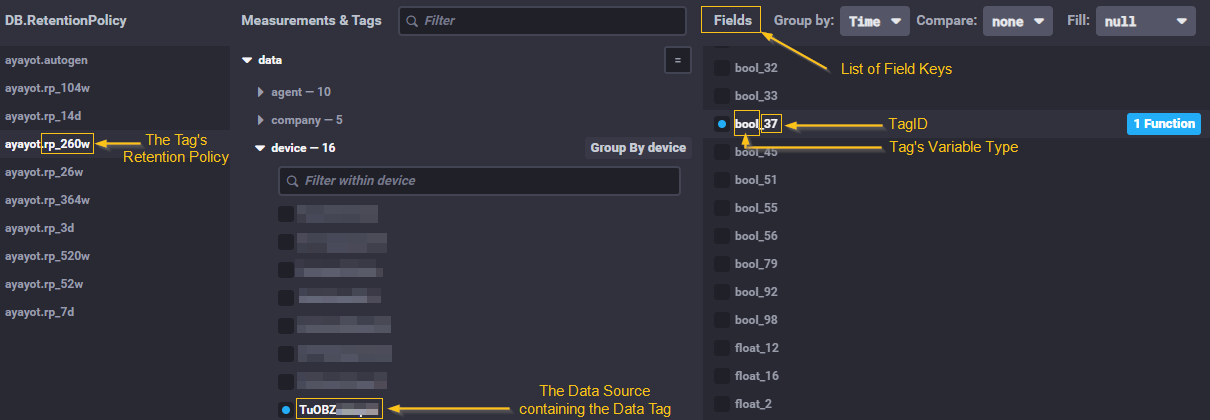
The connection is made via a generated **field key**. By combining the **variable type** and the **tag ID**, we create a unique identifier that tells InfluxDB exactly what kind of data it is holding without needing to perform a "Join" with the relational database.
***
# Resource mapping: who lives where?
Use this table to understand where each resource or field is handled or stored, and how it is referenced across databases.
| Resource/Field | Found in Relational Database? | Found in InfluxDB? | Role in the architecture |
| :------------------- | :---------------------------- | :--------------------------- | :---------------------------------------------------------------------------------------------------------------------------------------- |
| **Agent** | Yes | No | Its `publicId` (`string`) is retrieved and used to find one or more data source(s). |
| **Data Source** | Yes | Yes (through its `publicId`) | Its `publicId` (`string`) is used as the `device` tag filter. |
| **Tag** | Yes | Yes (through its `tagId`) | Its `tagId` (`int`) is the suffix of the Influx field, unique on a **data-source basis** (e.g. `37`). |
| **Slug (of a tag)** | Yes | No | A human-readable label (`string`, e.g. "batch-trigger") used to look up a tag. Unique on a data-source basis, mapping 1:1 to its `tagId`. |
| **Variable** | Yes | Yes (through its `type`) | Its `type` (`string`) is the prefix of the Influx field (e.g. `"bool"`, `"int"`). |
| **Retention Policy** | Yes | Yes | A piece of text (`string`) that determines how long data is kept (e.g. `"260w"`, meaning "260 weeks"). |
> 🚧 Retention Policy: In which cases can it be `null`?
>
> * A retention policy can be `null` if a tag belongs to Apps such as **Settings Tracking** or **State Analysis**: In this case, they are **not stored in InfluxDB**, so the tag does not necessarily get removed.
> * Another case could be a tag that uses a **custom MQTT broker**: These also do not have a retention policy.
>
> In short, we could say that if tags are logged into InfluxDB, then they will have a retention policy.
***
# The structure of a tag's identifier as field key
This table shows exactly how the information you see in your API's response results translates into the keys you need for an InfluxDB query.
| API's JSON response | Syntax | InfluxDB field key |
| :------------------------------------------ | :-------------------- | :----------------- |
| `"variable.type": "bool"` and `"tagId": 37` | `bool` + `_` + `37` | `bool_37` |
| `"variable.type": "float"`, `"tagId": 102` | `float` + `_` + `102` | `float_102` |
| `"variable.type": "int"`, `"tagId": 5` | `int` + `_` + `5` | `int_5` |
## Example of an implementation
When your application wants to display a graph for "Temperature," the underlying logic looks like this:
1. **API Response:** You find that "Temperature" has a `tagId` of **42** and a `varyable.type` value of **float**.
2. **Mapping:** Your code generates the field name **`float_42`**.
3. **Query:** You run `SELECT "float_42" FROM "device" WHERE "device" = 'YOUR_DATASOURCE_ID'`.
# `tagId` vs. `slug` vs. `publicId`: differences and relationships
A single tag carries **three** different identifiers, and
telling them apart is one of the most common points of confusion.
The following sections clarify how the `tagId` relates to the `slug` — and how both differ from the `publicId`.
> 📘 Three identifiers for one tag
>
> | Identifier | Type | Lives in | Used for |
> | -------------- | -------- | ------------------------ | -------------------------------------------------------------------------------------------------------- |
> | **`tagId`** | `int` | **Time-series InfluxDB** | The database identifier (e.g. `37`). Combined with the variable `type`, it forms the InfluxDB field key. |
> | **`slug`** | `string` | **Relational Database** | A human-readable lookup label (e.g. `"batch-trigger"`). |
> | **`publicId`** | `string` | **Relational Database** | Mainly used for resource manipulation via API (`GET`, `POST`, …). **Never** used in InfluxDB queries. |
## They identify the same tag... but in different ways
Neither value is derived or calculated from the other. Every tag is *created with all three identifiers*:
* **`tagId`** is an **integer** (for example, `37`). It is the machine-facing database identifier that InfluxDB actually stores data against.
In short: the **`slug` is the name you search by; the `tagId` is the number the database stores by.**
* **`slug`** is a **human-readable string** (for example, `"batch-trigger"`). It exists so that people don't have to memorize numeric IDs. It is optional and meant to be recognizable to you.
* **`publicId`** is an **identification string** (for example, `"6Y8DfPrzLhT1"`). In the IXON Cloud environment, `publicIds` are used as unique identifiers for **all resources**.
> 🚧 A `publicId` is not always useful
>
> Given the structure of the architecture of resources within the IXON Cloud, a `publicId` can always be present, but will not necessarily be used in queries.\
> In a use case where **data retrieval** is implemented, the `publicId` of a **Data Tag** will not be relevant, but its `tagId`or `slug` will be!\
> To learn more about what `publicIds` are for, check **How to identify resources and types: the publicId**.
## 1:1 correspondence per data source
Both the `slug` and the `tagId` are unique **within a single data source, not across the
whole agent**. So within one data source a given `slug` always points to exactly one `tagId`,
and vice versa. Across *different* data sources on the same agent, **the same value could
reappear**, which is why queries should always be scoped to a specific data source
(filtering on `source.publicId`) to avoid collisions.